

- Inclusion criteria that decide which units to include
- Allocation that sets the percentage of the included population to target
- A randomization field (targeting key) in the evaluation context that Confidence randomizes traffic on
- Exclusivity that controls how the audience relates to other experiments, rules, and segments
Inclusion Criteria
The audience is a set of filters that describe the conditions for inclusion. The filters must match the values in the evaluation context that clients use when resolving flags. For example, if you addcountry is Sweden as an inclusion criterion, you must include country in the evaluation context.
The value for country in the evaluation context must match Sweden to be part of the audience.
You can use four types of criteria to define your audience:
- Attributes: Match values in the evaluation context, such as country, platform, or version.
- Segments: Reference a pre-defined segment to reuse targeting logic across flags and experiments.
- Holdbacks: Include or exclude a random subset of users defined by a holdback on a surface.
- Groups: Combine multiple criteria with
ANDorORoperators.
AND or OR.
You can add multiple criteria to a group. With groups, you can create arbitrarily
complex inclusion criteria by adjusting the logical operator used between and within
groups.
Learn how to configure inclusion criteria in the Define the Audience guide.
Allocation
The allocation is the percentage of the targeted audience (after the inclusion criteria) that you want to allocate. You set the allocation as a percentage of the total audience size. For example, if the audience size is potentially 2,000, a 50% allocation allocates 1,000 users.You can increase the allocation for live A/B tests. Decreasing is not allowed for live A/B tests.
Control the allocation for rollouts by setting the rollout reach.
Randomization
Confidence uses randomization to assign variants to users. To randomize, Confidence needs to know which field in the evaluation context it should take the value from. If you do not specify a randomization field, Confidence uses the value from thetargeting_key field in the evaluation
context. If the field is not present in the evaluation context, the rule
doesn’t match and users are not assigned an variant by the rule.
The randomization field is often an identifier that has a value that is unique
for each user. For example, if you have a field called user_id in the
evaluation context, you can use that field for randomization.
The field in the evaluation context that you use for randomization must be a
string or an integer, otherwise Confidence fails to evaluate the rule and
the user is not exposed to the experiment.
Sticky Assignments
When you enable sticky assignments, Confidence writes all assignments to a storage that is accessible at resolve time with low latency. Use sticky assignment for two things- Pause intake of new entities to an experiment
- Ensure that entities are assigned the same variant throughout an experiment even if some of their targeting attributes change during the experiment.
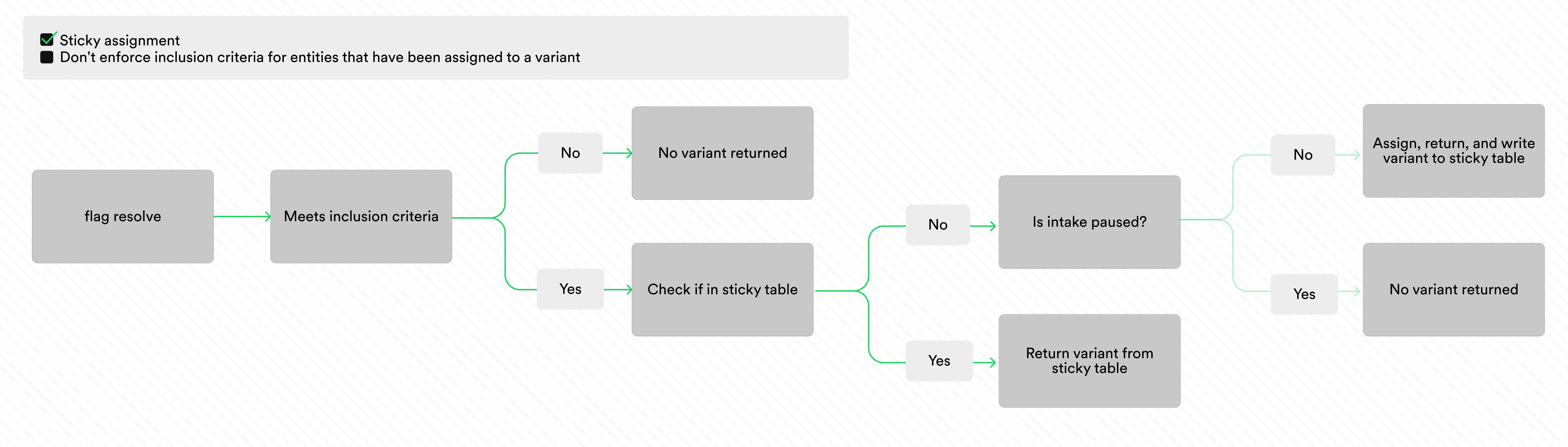
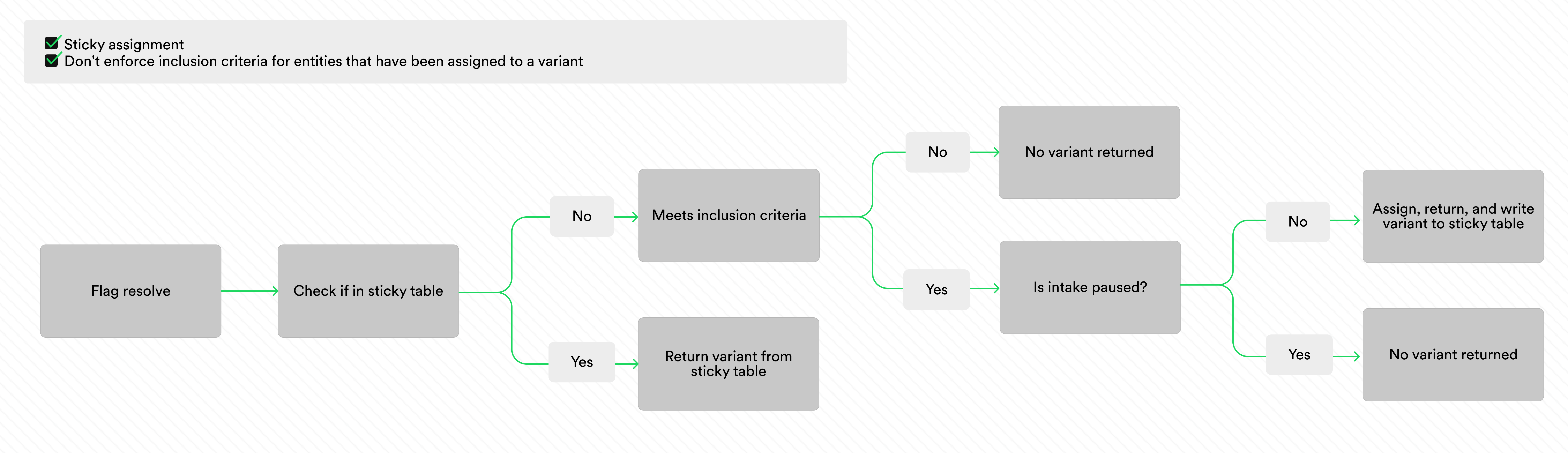
Don't enforce inclusion criteria for entities that have been assigned to a variant. The images below illustrate the evaluation logic for sticky
assignment with and without this checkbox checked.
Sticky assignments automatically clean up users after 90 days of inactivity. An entity that resolves again within those 90 days renews its TTL. For sticky assignment with the self-hosted resolver, you configure the TTL.
Paused Intake
When you enable sticky assignment, you can pause and restart intake on your experiments as many times as you want. With intake paused, Confidence stops assigning new entities to the experiment, and only the entities that are already assigned to the experiment keep being assigned to the experiment. This makes it possible to observe outcomes for the assigned entities over time without letting any more entities be assigned to the experiment. When you pause intake, Confidence returns the same variants for the assigned users by reading from the table.Entities with Target Attributes that Change
Sometimes you expect the targeting attributes used to define the inclusion criteria to change as a consequence of the treatment in the experiment. In experiments on, for example, conversion, you might want to only include users that are not converted to begin with, and use an inclusion criterion like ‘is not converted’. If a user converts during the experiment, you might want to keep serving them the same variant to be able to measure the longer term impact of the variant. With sticky assignment, if you check theDon't enforce inclusion criteria for entities that have been assigned to a variant - checkbox, Confidence does not evaluate the inclusion criteria on
resolves from already assigned users.