

Choose Your Warehouse
How Confidence Interacts With Your Data Warehouse
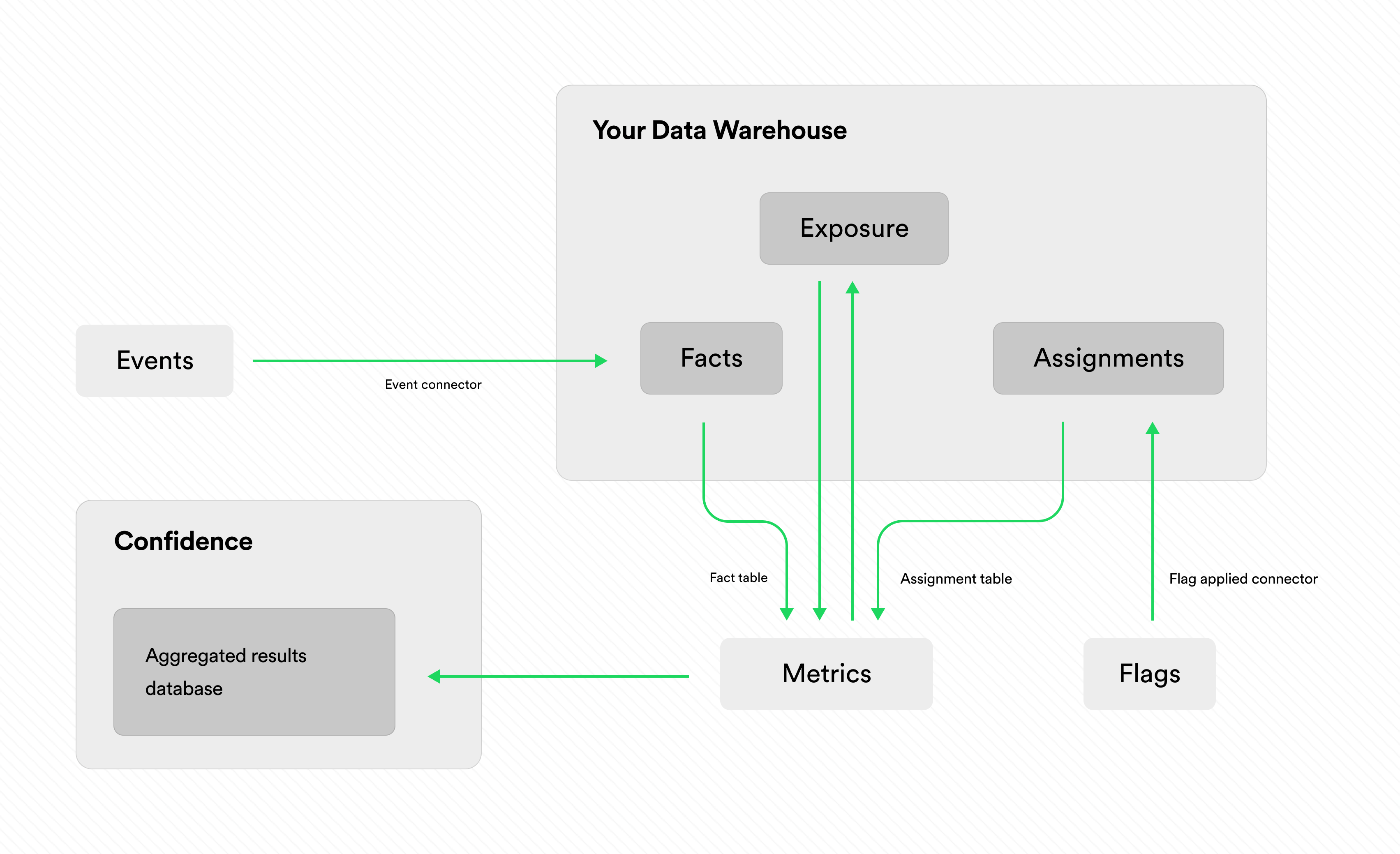
Depending on the functionality you want to use, Confidence needs access to read from and write to your data warehouse. Confidence needs write access to write:- general events that you log using the events service
- assignments when you resolve flags
- exposure tables calculated from assignment events
- assignments to calculate exposure
- data you want to use to calculate metrics
Queries in Your Data Warehouse
To calculate exposure and metrics, Confidence runs queries in your data warehouse. You can read more on the metrics page.Permissions
You can grant Confidence access only to the relevant tables in your data warehouse. You don’t need to grant global access to your entire data warehouse.Data Cache
Confidence caches aggregated results of metrics in its database to improve performance. The cache only includes the aggregated results of metrics, not the underlying data. For basic metrics, this means that Confidence stores the daily count, mean and variance for each treatment group.Transient Data in Confidence Flags
With Confidence Flags and the managed resolver, data temporarily passes through Confidence. The information that Confidence persists is:- The number of resolves and the timestamp of the last resolve.
- The number of applies and the timestamp of the last apply.
- The names of the fields available in the context. The values of the fields in the context are never stored.