

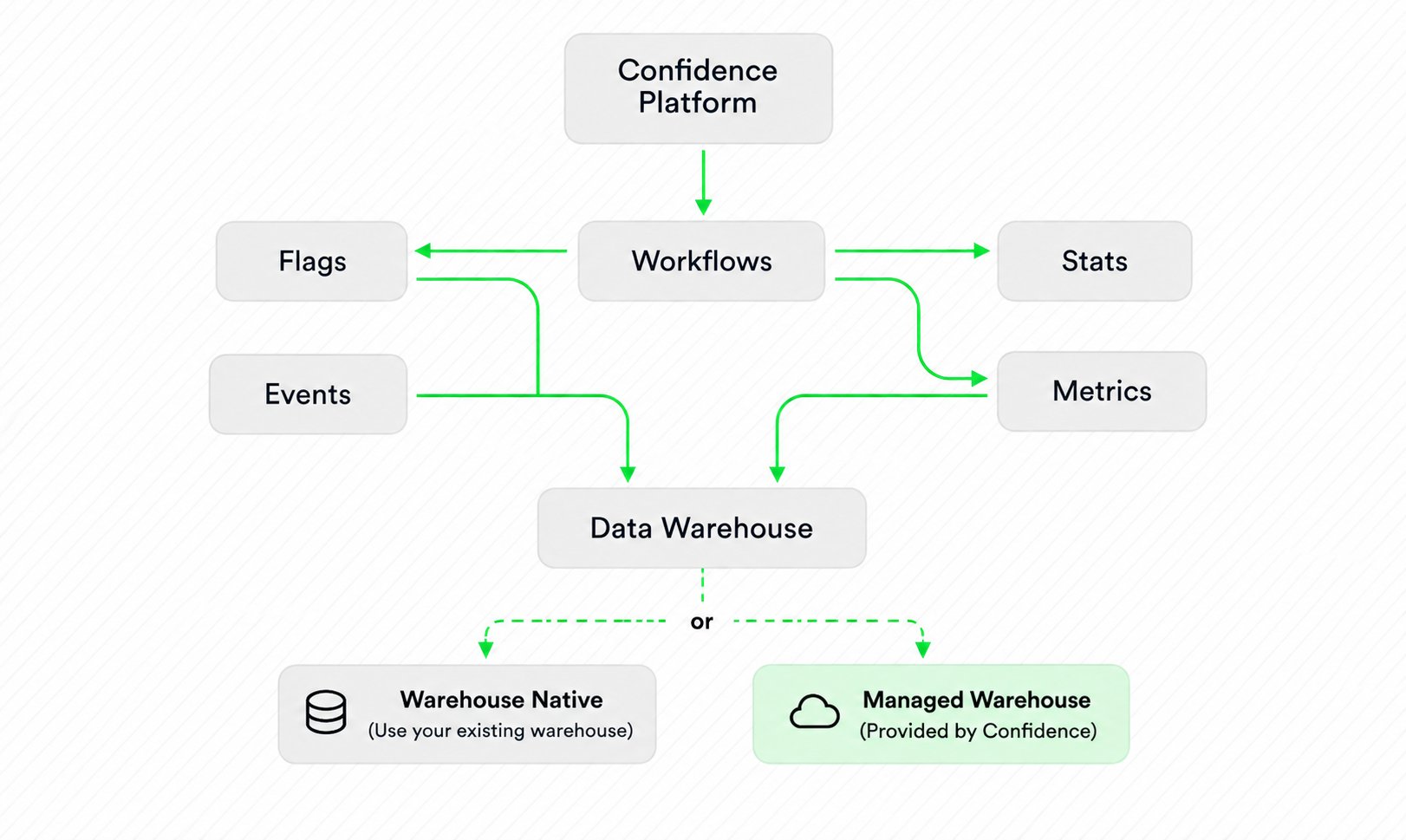
- Flags: Control experiences using feature flags.
- Events: Collect data from your users and store it in a data warehouse.
- Metrics: Define and compute metrics.
- Stats: Perform statistical testing and analysis.
- Workflows: Implement workflows to orchestrate experimentation designs.
Highlights of the Confidence APIs
- Extensible: Confidence is by design extensible. You can build your own experimentation platform on top of Confidence by using the APIs. Leverage the parts of Confidence that makes sense for you, and build the rest yourself.
- Warehouse-centric: Use Confidence Cloud, the warehouse that Confidence operates for you, or connect your own warehouse. Warehouse Native keeps data in your infrastructure.
- Usage-based pricing: You only pay for what you use. The price you pay depends on what features you use and how much you consume. You can start small and scale up as your experimentation program grows, without having to worry about upfront costs.
- Built for scale: Confidence supports large-scale experimentation programs, helping you with coordination and planning of experiments across teams and products. Use it with hundreds of teams to run thousands of experiments.
Learn More
Read more about the independent APIs that allow you to integrate Confidence with your existing tooling and infrastructure:- Flags API: feature flagging.
- Stats API: Spotify’s statistics engine.
- Metrics API: the metrics engine.
- Experiments API: experiment orchestration with A/B tests and rollouts.