

Get Started
Confidence computes metrics in a data warehouse. By default, your account uses Confidence Cloud, a warehouse that Confidence creates and operates for you, so you have nothing to set up. With Warehouse Native, you instead give Confidence permissions to read and write data in your own cloud data warehouse. You can limit access so Confidence only has access to the data it needs. Follow one of the quickstart guides to connect your warehouse: When your data warehouse is ready, follow the metrics quickstart guide to create a metric.What is a Metric?
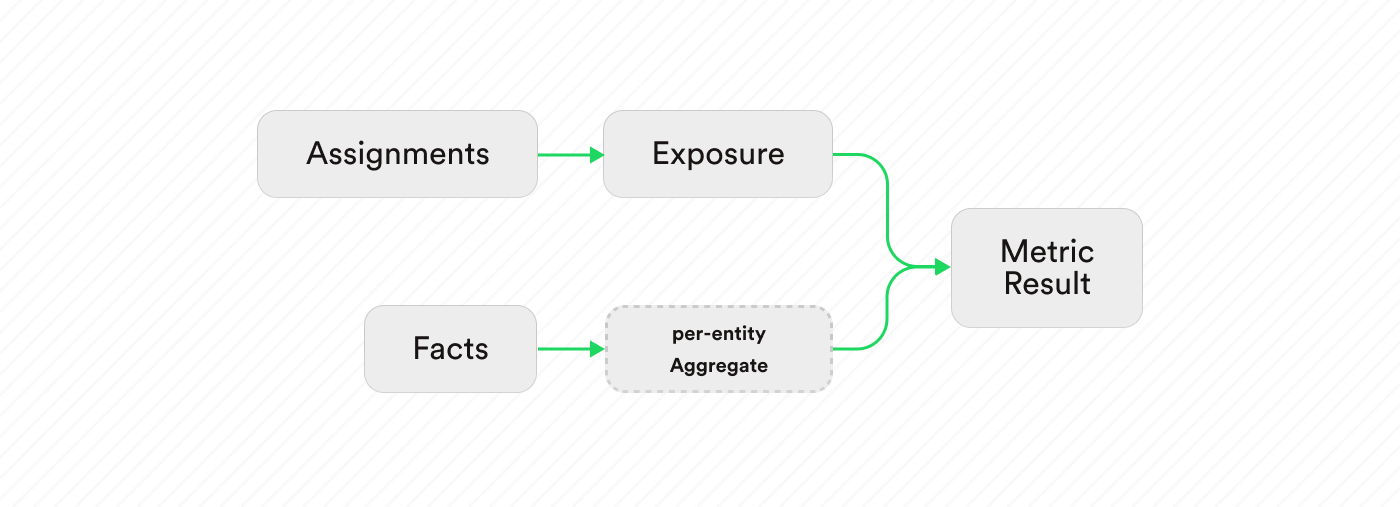
In Confidence, a metric is a way to measure the behavior of a user, a system or something else of interest. Use metrics to verify the success of an experiment, and to decide if a change has had a positive or negative impact on the exposed audience. The key concepts for defining a metric are:How Confidence Computes Metrics
1
Exposure
Exposure aggregates assignment data. The assignment data can have multiple
records of when a user was assigned to a variant. When computing exposure, Confidence
identifies the first time a user was assigned to a variant and uses that as the
exposure record. First exposure is the timestamp for when the user was first exposed,
which metric calculations use to get the right facts.
2
Per-Entity Aggregation
For metrics that are measuring an average across entities, metrics compute a
per-entity aggregation as a first step. This aggregation step reduces multiple facts per
entity into a single value.
You select the aggregation function (for example the sum, count, or average) in the metric
definition.
3
Metric Result
The metric calculation joins the per-entity measurements, or facts for metrics that do not require
a per-entity aggregation, with exposure.
After the join, the calculation averages the per-entity measurements per variant.
The first exposure timestamp selects the correct per-entity measurement, taking into account the
exposure offset parameter of the metric.
Related Resources
Create a Metric
Step-by-step metric setup tutorial
Create Metrics
Metric creation guide
Metrics Reference
Deep dive into metric types
Fact Tables
Configure measurement data sources