> ## Documentation Index
> Fetch the complete documentation index at: https://confidence.spotify.com/llms.txt
> Use this file to discover all available pages before exploring further.
# Introduction to Metrics
> Confidence Metrics is a managed service that computes metrics for experiments. Use Confidence Metrics integrated with your data warehouse if you are a Warehouse-Native Confidence user, or, base your metrics on events that you track and emit directly to Confidence with the Confidence SDKs if you are a Total Confidence user.
## Get Started
To use Confidence you need to have a cloud data warehouse and give permissions
to Confidence to read and write data to the warehouse. You can limit access so
Confidence only has access to the data it needs.
Follow one of the quickstart guides to set up Confidence with your data
warehouse:
Google BigQuery
Snowflake
Redshift
Databricks
After you have connected Confidence with your data warehouse, follow the
metrics quickstart guide to create a metric.
## What is a Metric?
In Confidence, a metric is a way to measure the behavior of a user, a system or
something else of interest. Use metrics to verify the success of an
experiment, and to decide if a change has had a positive or negative impact
on the exposed audience.
The key concepts for defining a metric are:
The unit that you want to measure, such as a user. [Entities](/docs/metrics/entities) are
identified by a unique ID, like a user ID.
A query that returns data about how entities were assigned to experiments and
variants. Confidence uses assignments to compute exposure for an experiment.
A query that returns data
about "facts" or measurements of interest, such as sales revenue, quantity
sold, number of customer orders, or any other measurable data points.
## How Confidence Computes Metrics
To compute a metric, Confidence goes through the following steps:
Exposure aggregates assignment data. The assignment data can have multiple
records of when a user was assigned to a variant. When computing exposure, Confidence
identifies the first time a user was assigned to a variant and uses that as the
exposure record. **First exposure** is the timestamp for when the user was first exposed,
which metric calculations use to get the right facts.
For metrics that are measuring an average across entities, metrics compute a
per-entity aggregation as a first step. This aggregation step reduces multiple facts per
entity into a single value.
You select the aggregation function (for example the sum, count, or average) in the metric
definition.
The metric calculation joins the per-entity measurements, or facts for metrics that do not require
a per-entity aggregation, with exposure.
After the join, the calculation averages the per-entity measurements per variant.
The first exposure timestamp selects the correct per-entity measurement, taking into account the
exposure offset parameter of the metric.
To improve performance, Confidence caches the data by writing the intermediate steps, such as the
exposure tables, to your data warehouse.
## Related Resources
Step-by-step metric setup tutorial
Metric creation guide
Deep dive into metric types
Configure measurement data sources
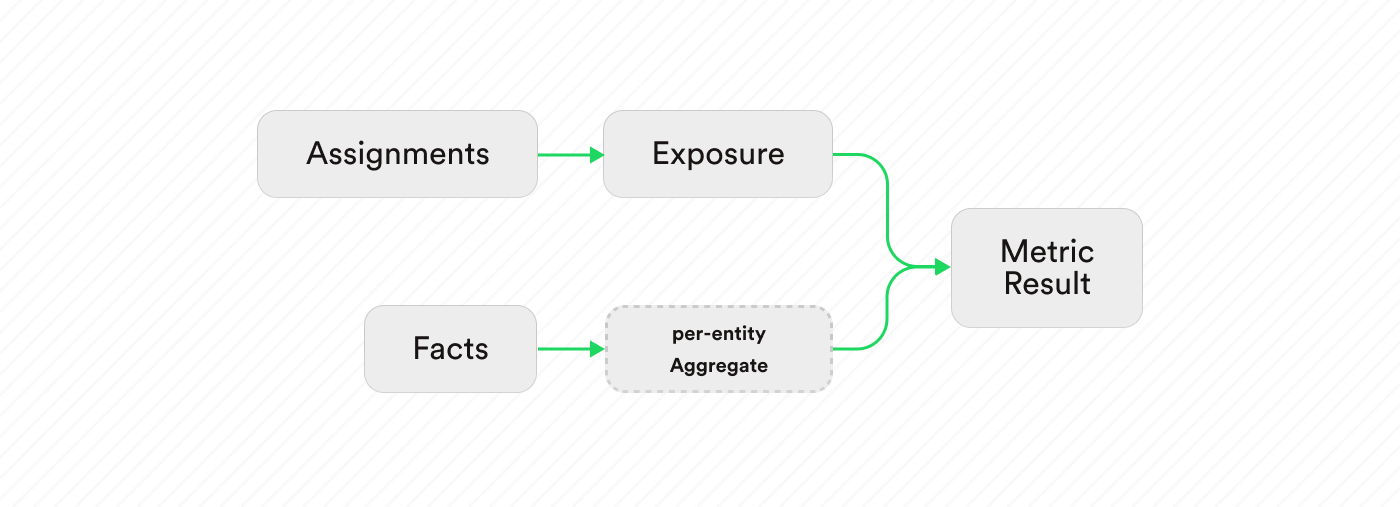 To compute a metric, Confidence goes through the following steps: