> ## Documentation Index
> Fetch the complete documentation index at: https://confidence.spotify.com/llms.txt
> Use this file to discover all available pages before exploring further.
# Introduction to Flags
> Confidence Flags is a managed service for feature flagging. It provides sophisticated targeting and coordination capabilities.
In Confidence, a flag is a way to control what experience a user should
receive. A flag has multiple variants, one for each intended experience, and
these variants describe the specifics of the experience.
This video gives a quick overview of how feature flags work in 2 minutes and 2 seconds.
Clients resolve flags to decide which experience to serve to a user. Common
types of clients are mobile apps, websites, and backend services. A set of
rules define what variant to assign to which users in what situations. The
resolver evaluates the rules and decides which variant to return to the client
using data in the evaluation context. The evaluation context is data about the
user, such as their country, age, or subscription status, and the environment
the client is running in, such as the browser type. The client feeds the
context to the resolver in the resolve request. If the context meets a rule's
targeting condition, the client receives the variant specified in the rule.
## Flag Anatomy
A flag has a name and a value. In Confidence, the flag value is a structure
with named properties. Think of it as a JSON object. This makes it possible to
control multiple aspects of the behavior of a client with a single flag. Flags
have a schema that describes the structure of the value: available properties
and their data types. Variants give a name to a value of the flag which defines
a possible behavior of the thing the flag is controlling.
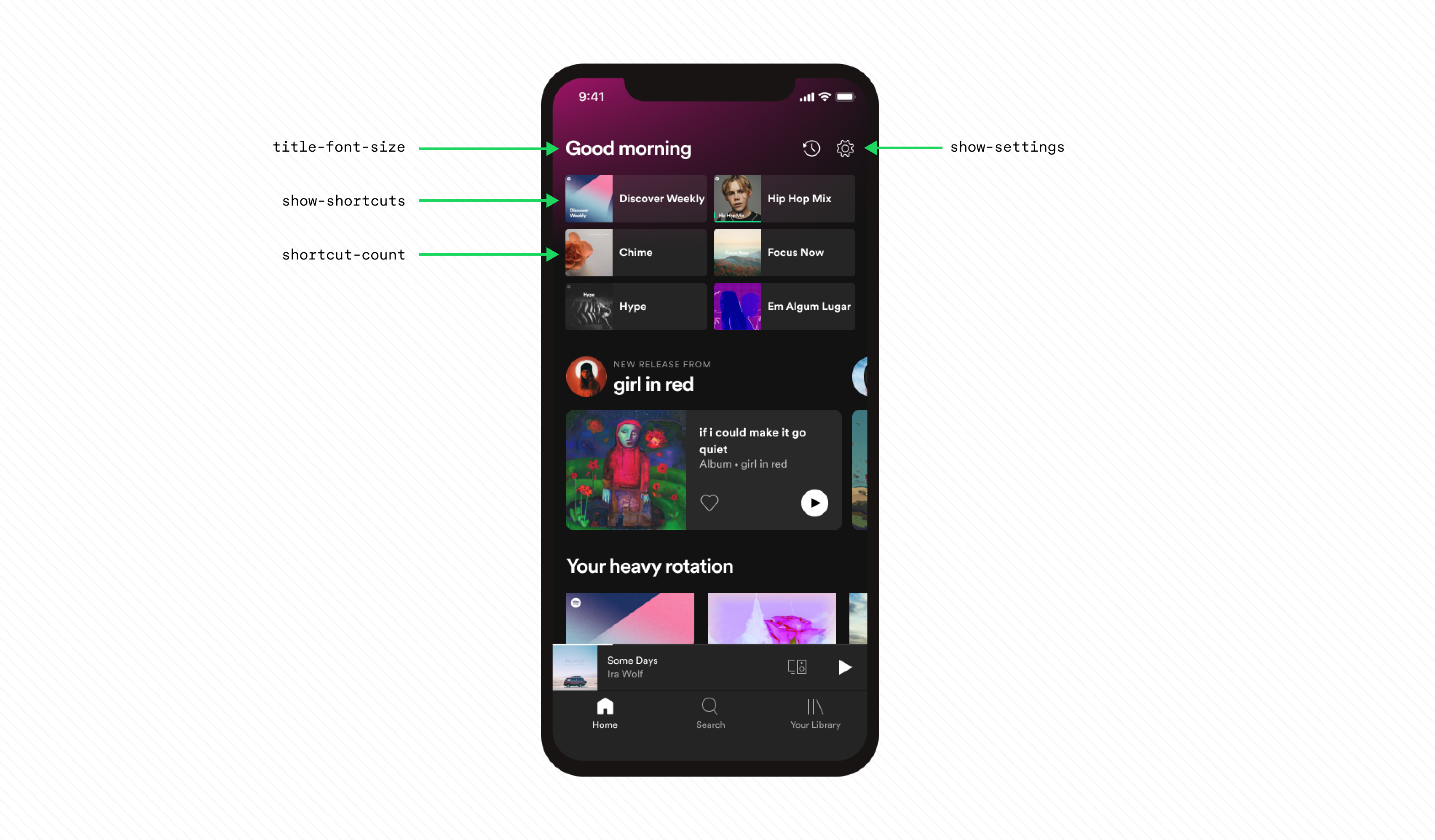
Imagine a flag that controls the various aspects of Spotify's home screen.
The flag has a name, `home-screen`, and the value has properties:
* The size of the title (`title-font-size`).
* Show the settings button or not (`show-settings`).
* Show shortcuts or not (`show-shortcuts`).
* Number of shortcuts to show (`shortcut-count`).
The schema for this flag is as follows:
| Property | Type | Description |
| :---------------- | :------ | :----------------------------------- |
| `title-font-size` | String | Size of the title font. |
| `show-settings` | Boolean | Whether to show the settings button. |
| `show-shortcuts` | Boolean | Whether to show shortcuts. |
| `shortcuts-count` | Integer | How many shortcuts to show. |
The flag has two variants: `default` and `large-title`. The `default` variant
has the following values:
| Property | Value |
| :---------------- | :-------- |
| `title-font-size` | `"small"` |
| `show-settings` | `true` |
| `show-shortcuts` | `true` |
| `shortcuts-count` | `9` |
The `large-title` variant has the following values:
| Property | Value |
| :---------------- | :-------- |
| `title-font-size` | `"large"` |
| `show-settings` | `false` |
| `show-shortcuts` | `true` |
| `shortcuts-count` | `6` |
With the flag and its variants in place, a client can resolve the flag to a
value. For example, a website can resolve the flag to the `large-title`
variant, and show a large title, hide the settings button, and show six
shortcuts.
When you use a flag to control an experience, the *flag is applied* and the
client emits a flag applied event. The resolver writes flag applied events, in
the form of assignment decision records, to a data warehouse for later use in
analysis of experiments.
## Client Types
Resolving a flag to a value and applying the flag value to control an experience
are two distinct operations. The type of client decides when these operations
happen.
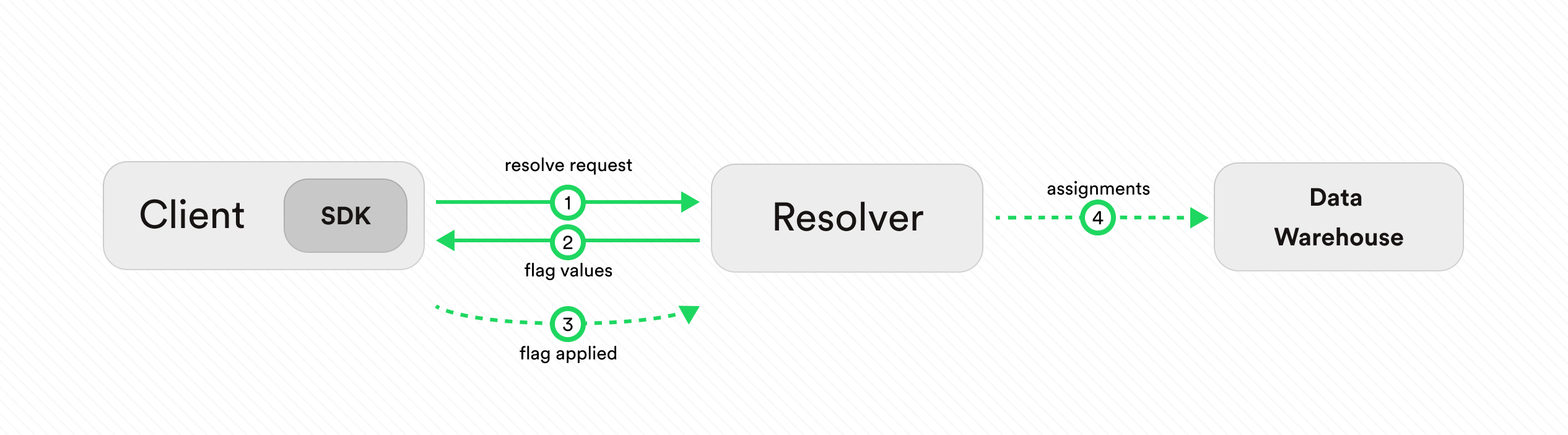
**Single-user clients**, such as mobile apps or single-page web applications,
resolve multiple flags (1, 2) at the start of a session. They later use locally
cached flag values when using flags throughout the session. The reason
for this is to reduce flickering of the user experience during the session.
When using a flag, the client emits an event (3) that says the flag
value was applied. If a client resolves a flag at the start of the session but
never uses it, it doesn't emit an event. The resolver writes a flag applied event
to a data warehouse for later use in analysis of experiments (4).
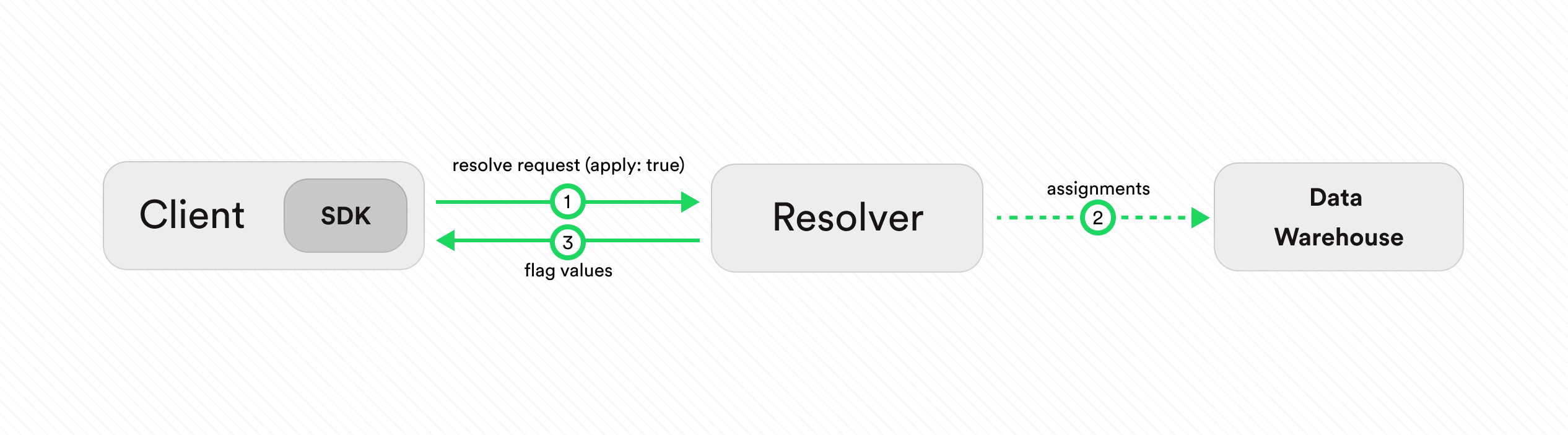
**Multi-user clients**, such as backend services, resolve flags as requests
come in (1). Since the clients use flag values directly when rendering the
response, the resolve and apply operations happen at the same time.
Use the option (`apply: true`) in the resolve request to Confidence to
apply the flag as the client resolves it (1, 3). As a consequence, the resolver
writes a flag applied event to a data warehouse for later use in analysis of experiments
(2).
If you are using one of Confidence Flags SDKs then you don't have to worry
about the details of the resolve and apply operations. The SDKs take care of
this for you.
Learn more about the concepts of Confidence Flags:
FlagsClientsRulesAudiencesSegments
## Confidence SDKs
Confidence provides SDKs for flag resolving with support for multiple languages and platforms.
More information about the Confidence SDKs is available in the [dedicated section](../sdks).
 The schema for this flag is as follows:
| Property | Type | Description |
| :---------------- | :------ | :----------------------------------- |
| `title-font-size` | String | Size of the title font. |
| `show-settings` | Boolean | Whether to show the settings button. |
| `show-shortcuts` | Boolean | Whether to show shortcuts. |
| `shortcuts-count` | Integer | How many shortcuts to show. |
The flag has two variants: `default` and `large-title`. The `default` variant
has the following values:
| Property | Value |
| :---------------- | :-------- |
| `title-font-size` | `"small"` |
| `show-settings` | `true` |
| `show-shortcuts` | `true` |
| `shortcuts-count` | `9` |
The `large-title` variant has the following values:
| Property | Value |
| :---------------- | :-------- |
| `title-font-size` | `"large"` |
| `show-settings` | `false` |
| `show-shortcuts` | `true` |
| `shortcuts-count` | `6` |
With the flag and its variants in place, a client can resolve the flag to a
value. For example, a website can resolve the flag to the `large-title`
variant, and show a large title, hide the settings button, and show six
shortcuts.
When you use a flag to control an experience, the *flag is applied* and the
client emits a flag applied event. The resolver writes flag applied events, in
the form of assignment decision records, to a data warehouse for later use in
analysis of experiments.
The schema for this flag is as follows:
| Property | Type | Description |
| :---------------- | :------ | :----------------------------------- |
| `title-font-size` | String | Size of the title font. |
| `show-settings` | Boolean | Whether to show the settings button. |
| `show-shortcuts` | Boolean | Whether to show shortcuts. |
| `shortcuts-count` | Integer | How many shortcuts to show. |
The flag has two variants: `default` and `large-title`. The `default` variant
has the following values:
| Property | Value |
| :---------------- | :-------- |
| `title-font-size` | `"small"` |
| `show-settings` | `true` |
| `show-shortcuts` | `true` |
| `shortcuts-count` | `9` |
The `large-title` variant has the following values:
| Property | Value |
| :---------------- | :-------- |
| `title-font-size` | `"large"` |
| `show-settings` | `false` |
| `show-shortcuts` | `true` |
| `shortcuts-count` | `6` |
With the flag and its variants in place, a client can resolve the flag to a
value. For example, a website can resolve the flag to the `large-title`
variant, and show a large title, hide the settings button, and show six
shortcuts.
When you use a flag to control an experience, the *flag is applied* and the
client emits a flag applied event. The resolver writes flag applied events, in
the form of assignment decision records, to a data warehouse for later use in
analysis of experiments.
 **Single-user clients**, such as mobile apps or single-page web applications,
resolve multiple flags (1, 2) at the start of a session. They later use locally
cached flag values when using flags throughout the session. The reason
for this is to reduce flickering of the user experience during the session.
When using a flag, the client emits an event (3) that says the flag
value was applied. If a client resolves a flag at the start of the session but
never uses it, it doesn't emit an event. The resolver writes a flag applied event
to a data warehouse for later use in analysis of experiments (4).
**Single-user clients**, such as mobile apps or single-page web applications,
resolve multiple flags (1, 2) at the start of a session. They later use locally
cached flag values when using flags throughout the session. The reason
for this is to reduce flickering of the user experience during the session.
When using a flag, the client emits an event (3) that says the flag
value was applied. If a client resolves a flag at the start of the session but
never uses it, it doesn't emit an event. The resolver writes a flag applied event
to a data warehouse for later use in analysis of experiments (4).
 **Multi-user clients**, such as backend services, resolve flags as requests
come in (1). Since the clients use flag values directly when rendering the
response, the resolve and apply operations happen at the same time.
Use the option (`apply: true`) in the resolve request to Confidence to
apply the flag as the client resolves it (1, 3). As a consequence, the resolver
writes a flag applied event to a data warehouse for later use in analysis of experiments
(2).
If you are using one of Confidence Flags SDKs then you don't have to worry
about the details of the resolve and apply operations. The SDKs take care of
this for you.
Learn more about the concepts of Confidence Flags:
**Multi-user clients**, such as backend services, resolve flags as requests
come in (1). Since the clients use flag values directly when rendering the
response, the resolve and apply operations happen at the same time.
Use the option (`apply: true`) in the resolve request to Confidence to
apply the flag as the client resolves it (1, 3). As a consequence, the resolver
writes a flag applied event to a data warehouse for later use in analysis of experiments
(2).
If you are using one of Confidence Flags SDKs then you don't have to worry
about the details of the resolve and apply operations. The SDKs take care of
this for you.
Learn more about the concepts of Confidence Flags: