> ## Documentation Index
> Fetch the complete documentation index at: https://confidence.spotify.com/llms.txt
> Use this file to discover all available pages before exploring further.
# Audience
> Reference documentation for audience targeting in rules and segments.
The audience is the set of users or other units that are eligible for a rule
or segment.
## Inclusion Criteria
The audience is a set of filters that describe the conditions for inclusion.
The filters must match the values in the evaluation context that clients use when resolving flags.
For example, if you add `country is Sweden` as an inclusion criterion, you must include `country` in the evaluation context.
The value for `country` in the evaluation context must match `Sweden` to be part of the audience.
You can use four types of criteria to define your audience:
* **Attributes**: Match values in the evaluation context, such as country, platform, or version.
* **Segments**: Reference a pre-defined [segment](./segments) to reuse targeting logic across flags and experiments.
* **Holdbacks**: Include or exclude a random subset of users defined by a [holdback](../surfaces/surface-settings#holdbacks) on a surface.
* **Groups**: Combine multiple criteria with `AND` or `OR` operators.
Filters can vary in complexity. They can, for example, exactly match a user ID,
or be more elaborate and match users in a certain country that are using a specific
browser with a specific version. You select how multiple criteria should logically work
together by choosing the operator to be `AND` or `OR`.
You can add multiple criteria to a group. With groups, you can create arbitrarily
complex inclusion criteria by adjusting the logical operator used between and within
groups.
Learn how to configure inclusion criteria in the [Define the Audience](/docs/how-to-guides/define-audience-criteria) guide.
## Allocation
The allocation is the percentage of the targeted audience (after the inclusion criteria) that you
want to allocate.
You set the allocation as a percentage of the total audience size.
For example, if the audience size is potentially 2,000, a 50% allocation allocates 1,000 users.
You can increase the allocation for live A/B tests. Decreasing is not allowed for live A/B tests.
Control the allocation for rollouts by setting the [rollout reach](/docs/quickstarts/launch-rollout).
## Randomization
Confidence uses randomization to assign variants to users. To randomize, Confidence needs to know which field in the evaluation context
it should take the value from. If you do not specify a randomization field,
Confidence uses the value from the `targeting_key` field in the evaluation
context. If the field is not present in the evaluation context, the rule
doesn't match and users are not assigned an variant by the rule.
The randomization field is often an identifier that has a value that is unique
for each user. For example, if you have a field called `user_id` in the
evaluation context, you can use that field for randomization.
For applications that have both authenticated and unauthenticated experiences,
you should pass all known identifiers to Confidence. For example, if you use a
visitor ID for users that haven't authenticated, and a user ID when they
authenticate, pass both the visitor ID and the user ID to Confidence after the
user has authenticated.
When experimenting, select the field that maps best to the user experience
you are experimenting on. For example, if you are experimenting on the
visitors that haven't authenticated, and you want them to have a consistent
experience as they authenticate, you should use the visitor ID for randomization.
Read more about [authenticated and non-authenticated users](/docs/experiments/unauthenticated-users)
The field in the evaluation context that you use for randomization must be a
string or an integer, otherwise Confidence fails to evaluate the rule and
the user is not exposed to the experiment.
## Sticky Assignments
When you enable sticky assignments, Confidence writes all assignments to a
storage that is accessible at resolve time with low latency.
Use sticky assignment for two things
* Pause intake of new entities to an experiment
* Ensure that entities are assigned the same variant throughout an experiment even if some of their targeting
attributes change during the experiment.
With sticky assignment selected, you can select whether you want targeting
criteria to apply after an entity is first assigned a variant.
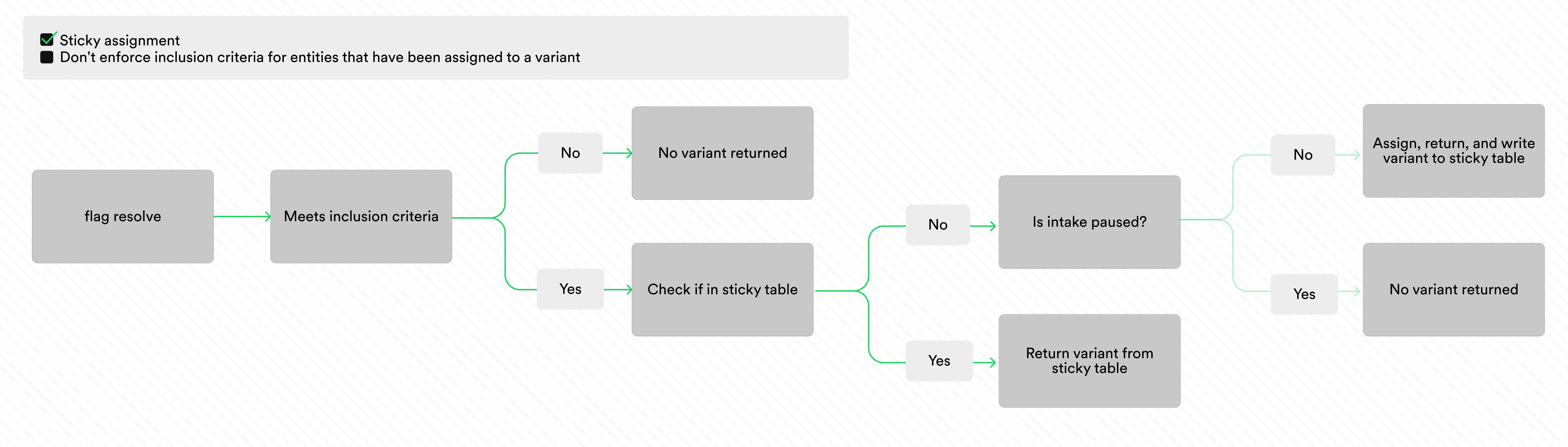
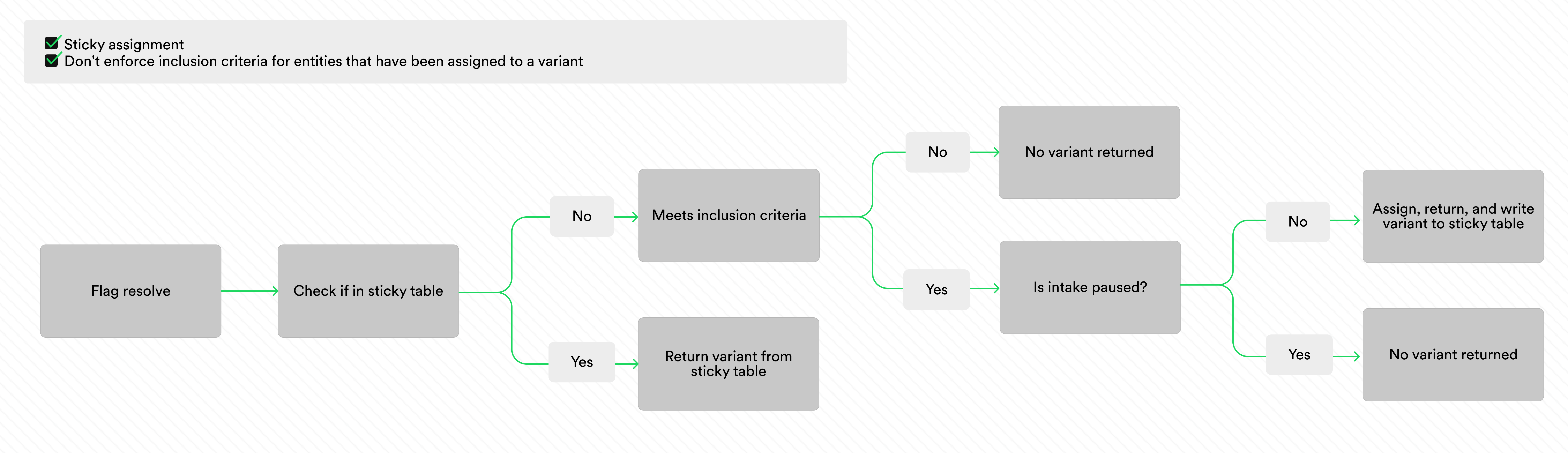
You control the behavior of the inclusion criteria with the checkbox `Don't enforce inclusion criteria for entities that have been assigned to a
variant`. The images below illustrate the evaluation logic for sticky
assignment with and without this checkbox checked.
 You can use sticky assignment with the sidecar resolver by hosting your own sticky assignment table. Read more about the [sidecar resolver](/docs/how-to-guides/setup-local-resolver).
Sticky assignments automatically clean up users after 90 days of inactivity. An entity that resolves again within those 90 days renews its TTL. For sticky assignment with the sidecar resolver, you configure the TTL.
### Paused Intake
When you enable sticky assignment, you can pause and restart intake on your
experiments as many times as you want. With intake paused, Confidence stops
assigning new entities to the experiment, and only the entities that are already
assigned to the experiment keep being assigned to the experiment. This
makes it possible to observe outcomes for the assigned entities over
time without letting any more entities be assigned to the experiment. When you pause intake, Confidence returns the
same variants for the assigned users by reading from the table.
Use sticky assignments to evaluate the long-term impact when the cost of exposing new entities is costly. For example, if there is a cost associated with each user entering the experiment, you can expose the number of users you need to evaluate the long-term impact and then pause intake.
### Entities with Target Attributes that Change
Sometimes you expect the targeting attributes used to define the inclusion criteria to change as a consequence of the treatment in the experiment. In
experiments on, for example, conversion, you might want to only include users
that are not converted to begin with, and use an inclusion criterion
like 'is not converted'. If a user converts during the experiment, you
might want to keep serving them the same variant to be able to measure the
longer term impact of the variant. With sticky assignment, if you check the
`Don't enforce inclusion criteria for entities that have been assigned to a
variant` - checkbox, Confidence does not evaluate the inclusion criteria on
resolves from already assigned users.
## Exclusivity
Make experiments mutually exclusive to each other by using exclusivity groups.
Exclusivity groups lives on surfaces. Read more in the [surface documentation](../surfaces#exclusivity-groups).
## Related Resources
Configure targeting criteria
Understand rule types and evaluation
Create reusable user groups
Set up mutual exclusion
You can use sticky assignment with the sidecar resolver by hosting your own sticky assignment table. Read more about the [sidecar resolver](/docs/how-to-guides/setup-local-resolver).
Sticky assignments automatically clean up users after 90 days of inactivity. An entity that resolves again within those 90 days renews its TTL. For sticky assignment with the sidecar resolver, you configure the TTL.
### Paused Intake
When you enable sticky assignment, you can pause and restart intake on your
experiments as many times as you want. With intake paused, Confidence stops
assigning new entities to the experiment, and only the entities that are already
assigned to the experiment keep being assigned to the experiment. This
makes it possible to observe outcomes for the assigned entities over
time without letting any more entities be assigned to the experiment. When you pause intake, Confidence returns the
same variants for the assigned users by reading from the table.
Use sticky assignments to evaluate the long-term impact when the cost of exposing new entities is costly. For example, if there is a cost associated with each user entering the experiment, you can expose the number of users you need to evaluate the long-term impact and then pause intake.
### Entities with Target Attributes that Change
Sometimes you expect the targeting attributes used to define the inclusion criteria to change as a consequence of the treatment in the experiment. In
experiments on, for example, conversion, you might want to only include users
that are not converted to begin with, and use an inclusion criterion
like 'is not converted'. If a user converts during the experiment, you
might want to keep serving them the same variant to be able to measure the
longer term impact of the variant. With sticky assignment, if you check the
`Don't enforce inclusion criteria for entities that have been assigned to a
variant` - checkbox, Confidence does not evaluate the inclusion criteria on
resolves from already assigned users.
## Exclusivity
Make experiments mutually exclusive to each other by using exclusivity groups.
Exclusivity groups lives on surfaces. Read more in the [surface documentation](../surfaces#exclusivity-groups).
## Related Resources
Configure targeting criteria
Understand rule types and evaluation
Create reusable user groups
Set up mutual exclusion