> ## Documentation Index
> Fetch the complete documentation index at: https://confidence.spotify.com/llms.txt
> Use this file to discover all available pages before exploring further.
# Warehouse-Native Confidence
> Warehouse-Native Confidence is a modern experimentation platform that runs on top of your warehouse.
export const NotForSpotify = () =>
This page doesn't apply at Spotify. Use the Spotify
documentation in the sidebar.
;
{user?.groups?.includes("spotify") && }
Data integrity is a core value of Confidence. Warehouse-Native Confidence runs on top of your data warehouse, so
you can be confident that your data is safe, right, and up to date. You have full transparency
into what Confidence does with your data, and you can audit and reproduce calculations.
## How Confidence Interacts With Your Data Warehouse
Depending on the functionality you want to use, Confidence needs access to read from and write to
your data warehouse.
Confidence needs write access to write:
* general events that you log using the events service
* assignments when you resolve flags
* exposure tables calculated from assignment events
Confidence needs read access to read:
* assignments to calculate exposure
* data you want to use to calculate metrics
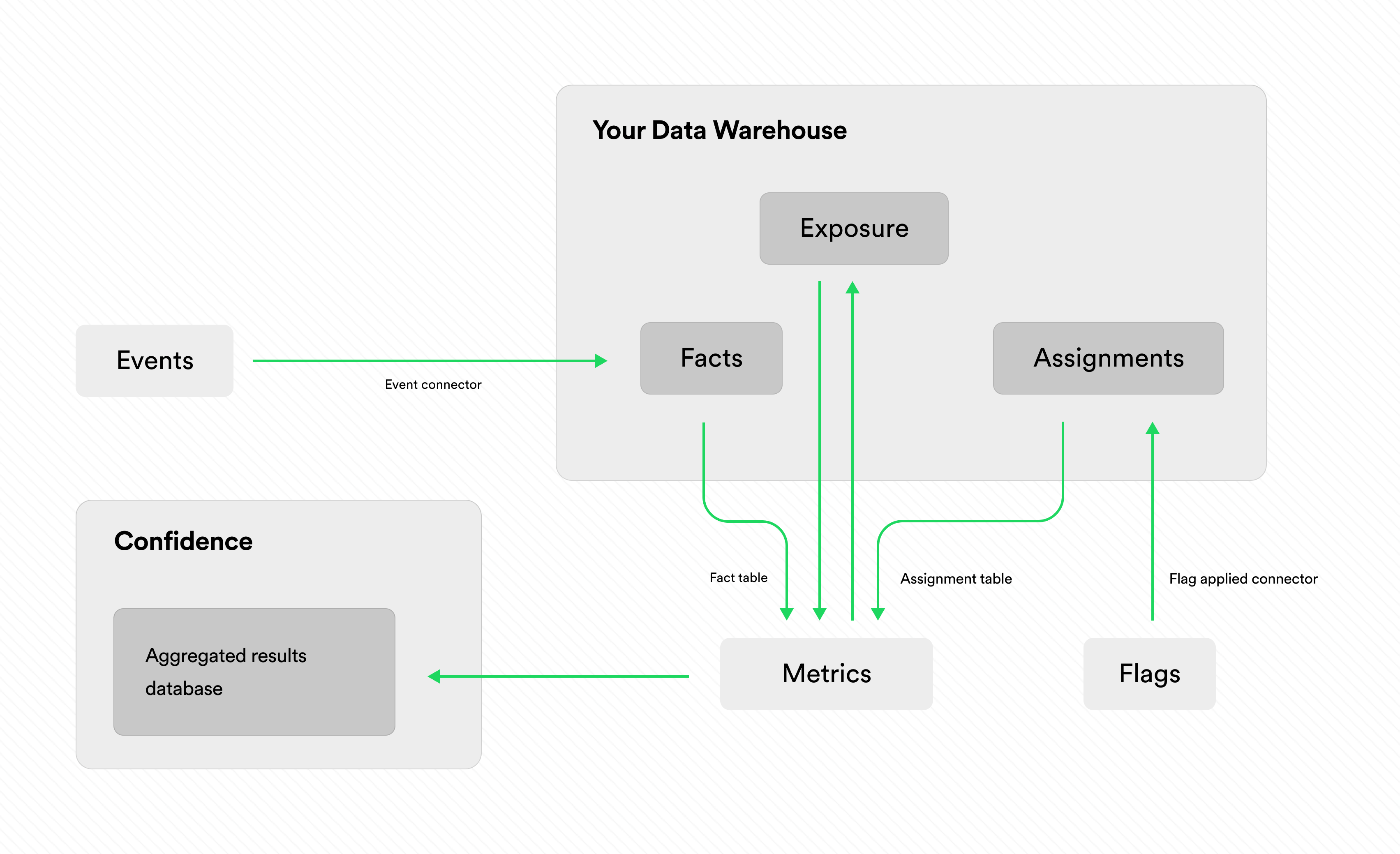
The figure below gives a high-level overview of how the events, metrics, and flags services in
Confidence read and write to your data warehouse.
You can use only a subset of these services.
In that case, only the relevant parts of the diagram apply.
 ## Queries in Your Data Warehouse
To calculate exposure and metrics, Confidence runs queries in your data warehouse.
You can read more on the [metrics page](./metrics/introduction#how-confidence-computes-metrics).
### Permissions
You can grant Confidence access only to the relevant tables in your data warehouse.
You don't need to grant global access to your entire data warehouse.
### Data Cache
Confidence caches aggregated results of metrics in its database to improve performance.
The cache only includes the aggregated results of metrics, not the underlying data.
For basic metrics, this means that Confidence stores the daily count, mean and variance for each
treatment group.
## Transient Data in Confidence Flags
With Confidence Flags and the managed resolver, data temporarily passes through Confidence.
The information that Confidence persists is:
* The number of resolves and the timestamp of the last resolve.
* The number of applies and the timestamp of the last apply.
* The names of the fields available in the context. The values of the fields in the context are
never stored.
Read more on the [data transfer page](./flags/introduction#data-transfer).
## Queries in Your Data Warehouse
To calculate exposure and metrics, Confidence runs queries in your data warehouse.
You can read more on the [metrics page](./metrics/introduction#how-confidence-computes-metrics).
### Permissions
You can grant Confidence access only to the relevant tables in your data warehouse.
You don't need to grant global access to your entire data warehouse.
### Data Cache
Confidence caches aggregated results of metrics in its database to improve performance.
The cache only includes the aggregated results of metrics, not the underlying data.
For basic metrics, this means that Confidence stores the daily count, mean and variance for each
treatment group.
## Transient Data in Confidence Flags
With Confidence Flags and the managed resolver, data temporarily passes through Confidence.
The information that Confidence persists is:
* The number of resolves and the timestamp of the last resolve.
* The number of applies and the timestamp of the last apply.
* The names of the fields available in the context. The values of the fields in the context are
never stored.
Read more on the [data transfer page](./flags/introduction#data-transfer).